3.重新启动mysqld
# service mysqld restart
Stopping MySQL: [ OK ]
Starting MySQL: [ OK ]
4.登录并修改MySQL的root密码
# mysql
Welcome to the MySQL monitor. Commands end with ; or \g.
Your MySQL connection id is 3 to server version: 3.23.56
Type ‘help;’ or ‘\h’ for help. Type ‘\c’ to clear the buffer.
mysql> USE mysql ;
Database changed
mysql> UPDATE user SET Password = password ( ‘new-password’ ) WHERE User = ‘root’ ;
Query OK, 0 rows affected (0.00 sec)
Rows matched: 2 Changed: 0 Warnings: 0
mysql> flush privileges ;
Query OK, 0 rows affected (0.01 sec)
mysql> quit
5.将MySQL的登录设置修改回来
# vim /etc/my.cnf
将刚才在[mysqld]的段中加上的skip-grant-tables删除
保存并且退出vim
6.重新启动mysqld
# service mysqld restart
Stopping MySQL: [ OK ]
Starting MySQL: [ OK ]
ADB server didn’t ACK 这个问题会困恼很多的新手朋友,我以前刚开始做Android的时候也遇到过这个问题,不过自己百度,google啥的,也不知道怎么就给解决了,看到群里很多新手朋友都会问这个问题,说实话我也没有一个解决这个问题的终极方法(百试百灵的那种,哈哈),自己没遇到也没有认真的去对待他,今天,就是在今天,我打开Eclipse连上手机,准备调试程序,出现如下的信息
The connection to adb is down, and a severe error has occured.
You must restart adb and Eclipse.
Please ensure that adb is correctly located at ‘D:\android-2.2-windows\platform-tools\adb.exe’and can be executed.


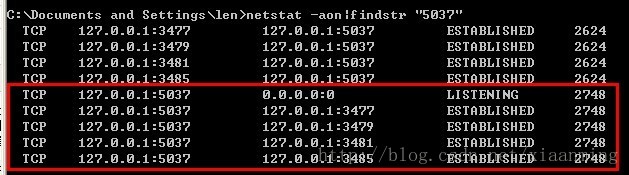
 注: 我这里5037端口是正确的被adb.exe占用,如果是你,就是其他的应用程序啦